Version v0.5.5 of the documentation is no longer actively maintained. The site that you are currently viewing is an archived snapshot. For up-to-date documentation, see the latest version.
Variables & Connections
Dexaflow stores Variables and Connections in the control plane (connection
secrets encrypted at rest, AES-256-GCM, ADR 0019; Variables too when the operator
sets variable_encryption: on; on Lite read
what that protects) and delivers them to task pods
at runtime as environment variables, so your task reads them with the native
Airflow APIs and as plain env (ADR 0021).
Tenancy is single-tenant on Lite; Pro adds multi-tenant isolation. The agent injects the current tenant’s Variables/Connections per ADR 0019.
Encryption at rest on Lite
On Pro the key is DEXAFLOW_SECRET_KEY, which you provision and keep apart
from the database. On Lite it is narrower, and worth knowing before you store a
production credential (#486):
- The key sits next to the data.
dexaflow setupwrites a per-install key to~/.dexaflow/config.yaml, in the same home directory as the datastore. The encryption protects a copy of the datastore on its own. It does not protect a copy of your whole~/.dexaflow, and adexaflow lite backuparchive holds the key and the ciphertext together. - An install created before 0.5.0 uses a published key. Until you run
dexaflow lite migrate-key(0.5.1 and later), its connection secrets are encrypted with a key compiled into this repository, the same on every such install, so anyone who obtains the datastore can read them.dexaflow litewarns about this on every start.
See Rotating the encryption key for the migration and for key rotation on Pro.
Manage them
Via the Airflow-compatible UI (Admin → Variables / Connections) or the API:
# Variable
curl -X POST "$DEXAFLOW_SERVER/api/v2/variables" -H "Authorization: Bearer $TOKEN" \
  -H 'Content-Type: application/json' -d '{"key":"greeting","value":"hello"}'

# Connection (password + extra are encrypted at rest)
curl -X POST "$DEXAFLOW_SERVER/api/v2/connections" -H "Authorization: Bearer $TOKEN" \
  -H 'Content-Type: application/json' \
  -d '{"connection_id":"warehouse","conn_type":"postgres","host":"db","login":"u","password":"p","schema":"analytics"}'
In the UI: connection types & editing
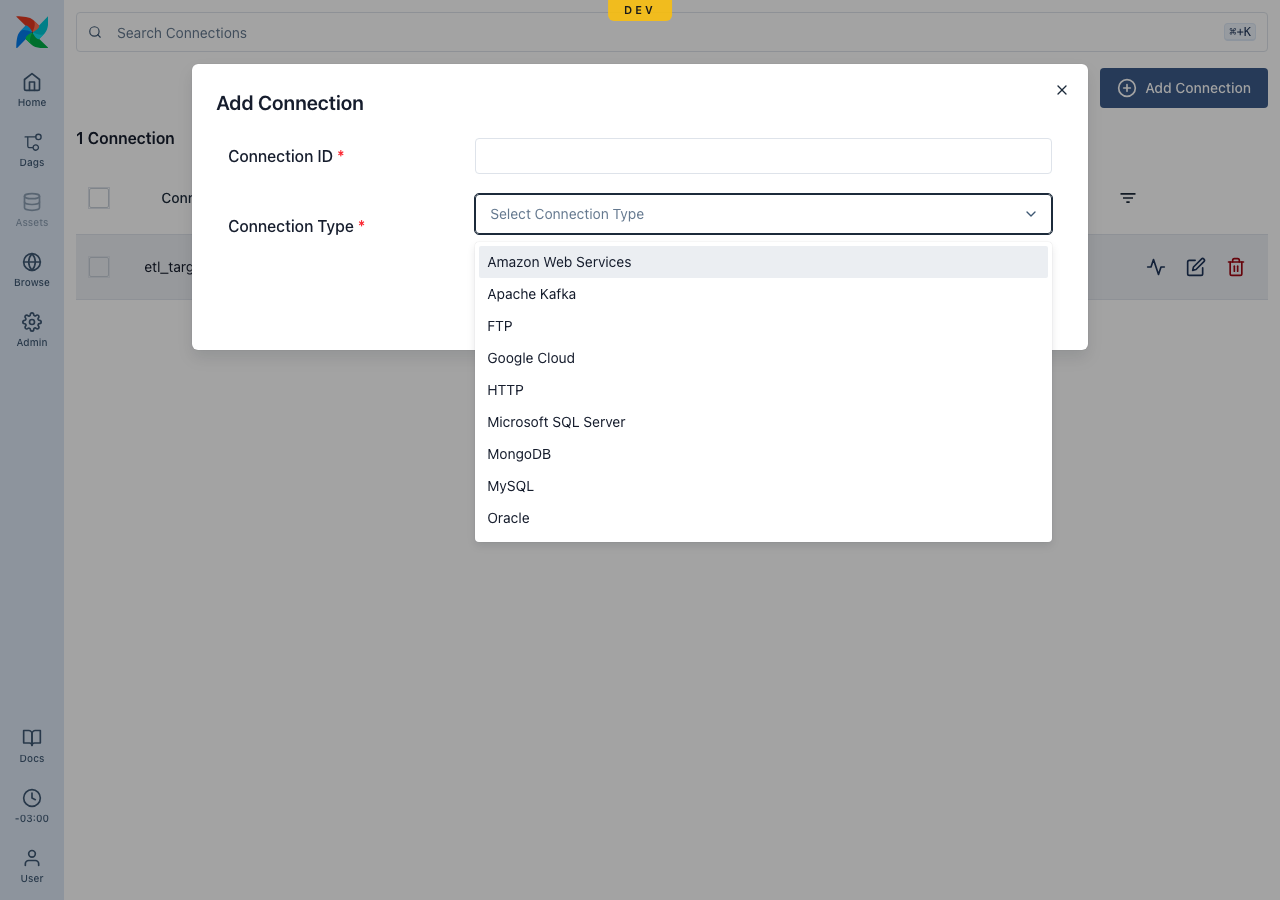
The Admin → Connections form offers a catalog of common connection types (borrowed from Airflow’s providers — Postgres, MySQL, HTTP, AWS, Google Cloud, Snowflake, Redis, SSH, …); pick one and edit the fields it needs.
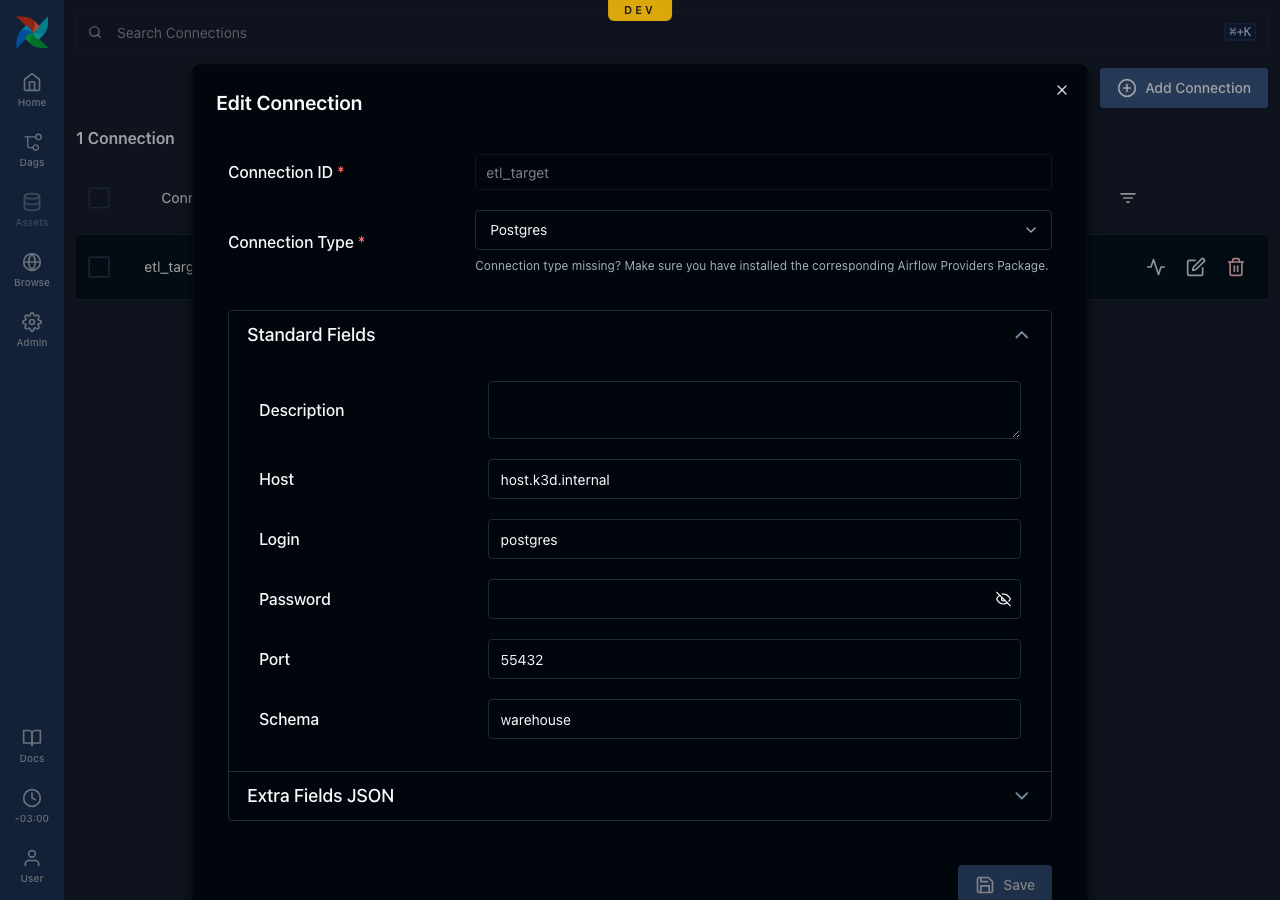
The form renders the standard fields for the chosen type (host, login, password, port, schema, description) plus an Extra JSON block, and an existing connection opens pre-filled (the password is write-only and never returned):
Test a connection
The Test button (POST /api/v2/connections/test) checks the endpoint’s
reachability from the control plane — an HTTP(S) request, or a TCP dial to
host:port (the type’s well-known port when none is set) — and returns
{status, message}. Note this tests from the control plane, not the task pod, so
a host only resolvable inside the cluster (e.g. host.k3d.internal in dev) reads
as unreachable there even though pods can reach it. Full per-provider credential
validation needs the provider hooks (a later addition).
Declare what a task consumes
A task doesn’t automatically get the value just because it exists on the
control plane — the DAG that consumes a Variable or Connection should
declare it in dexaflow.yaml, the same consumption-declared model
declared secrets use:
# dexaflow.yaml
dag_id: sales_report
variables:
  - greeting
connections:
  - warehouse
The three-step flow is: create the Variable/Connection (UI or API, above) →
declare it in dexaflow.yaml → read it in the task (below).
The control plane’s secret-delivery policy (auth.secret_scoping, ADR
0055) has two modes:
permissive(the shipped default) delivers the whole tenant vault to every task regardless of declaration, and only logs a warning when a task’s declared set is narrower than what it received. An undeclared Variable or Connection still resolves —Variable.getdoes not return empty under this default. A clean warning trail proves only that no DAG whose declarations still resolve is over-served; it does not prove that no DAG would lose secrets underenforce. Two populations never appear in the trail: a DAG that declares nothing, and a DAG whose declared names no longer exist in the vault — the warning counts only declared names that actually resolve, so an all-stale declaration counts as zero. Both receive the whole vault today and nothing underenforce(#800).enforcedelivers only the declared subset — an undeclared name is not delivered, andVariable.get/BaseHook.get_connectionfor it comes back empty/missing, exactly like a declared-secrets task that requested nothing.
Declare anyway, even under permissive. It documents your DAG’s real
dependencies, matches how a deploy already warns you about missing
connections (see Deploy your first Pro DAG),
and is what makes the DAG portable to a tenant running enforce — the
direction least-privilege delivery is headed (tracked in
#59). An operator sets the
policy cluster-wide; it is never a DAG-author setting.
Read them in a task
The agent injects each tenant’s Variables/Connections before running your code:
AIRFLOW_VAR_<KEY>(uppercased) →Variable.get("key")AIRFLOW_CONN_<ID>(a connection URI, withextracarried under__extra__) →BaseHook.get_connection("id")
from airflow.sdk import task

@task
def use_secrets():
    import os
    from airflow.sdk import Variable          # native Airflow API
    print(Variable.get("greeting"))           # "hello"
    print(os.environ["AIRFLOW_VAR_GREETING"]) # also a plain env var
In a bash task, reference the same names as shell variables
("$AIRFLOW_VAR_GREETING") rather than rendering a secret with
{{ var.value.x }} or {{ conn.x }}: a rendered value becomes part of the
process command line, which ps and logs can expose. See
Bash templating and
ADR 0070.
Scope is global (per tenant). Delivery requires a secure agent channel (TLS, #58)
or, in dev, the explicit DEXAFLOW_AGENT_ALLOW_INSECURE_SECRETS=true (set by
dexaflow lite). Pro on Kubernetes (including GKE) requires TLS — the chart
ships agentTLS.enabled: true by default and the server refuses the insecure
bypass; the plaintext escape hatch is Lite-only, for local iteration. See
ADR 0021.